Open source · MIT License · Rust 2024 Edition

Version control
you fully own

Every repository is a single encrypted file you can store on any cloud, NAS, or USB drive. Ed25519 encryption, Git-compatible workflow, built-in CI/CD, and a web UI — all in one 16 MB binary.

terminal
$ curl -fsSL https://raw.githubusercontent.com/Olib-AI/ovc/main/scripts/install.sh | bash

Windows: irm https://raw.githubusercontent.com/Olib-AI/ovc/main/scripts/install.ps1 | iex  ·  Build from source

16 MB
Single Binary
47
CLI Commands
26
Built-in CI Checks
200+
Tests

Everything in one encrypted file

No server to manage. No SaaS dependency. One portable file per repository, encrypted with keys you control.

Encrypted at rest

XChaCha20-Poly1305 with Ed25519+X25519 key pairs. An attacker with the file sees only ciphertext.

Single portable file

Your entire repo — code, branches, tags, history — lives in one .ovc file you can drop anywhere.

Commit signing

Ed25519 signatures on every commit. Verified/unverified badges in CLI and web UI. No GPG needed.

Built-in CI/CD

26 built-in checks, parallel DAG execution, matrix strategy, secrets vault, Docker support. No external tools.

Git-compatible

Bidirectional import/export with full history fidelity. Same workflow you already know.

Multi-user + RBAC

Share via cloud storage with file locking, conflict detection, auto-merge. Per-user roles and branch protection.

Cloud sync

Content-defined chunking via FastCDC. Only changed parts transfer. Supports iCloud, GCS, NAS, and more.

Premium web UI

Commit graph, split diff viewer, blame view, code search, command palette. Embedded in the binary.

Single 16 MB binary

VCS + crypto + git bridge + cloud sync + CI engine + web server + React UI. No runtime dependencies.

A premium interface, embedded in the binary

No Node.js required in production. The entire React UI compiles into the binary and serves on localhost.

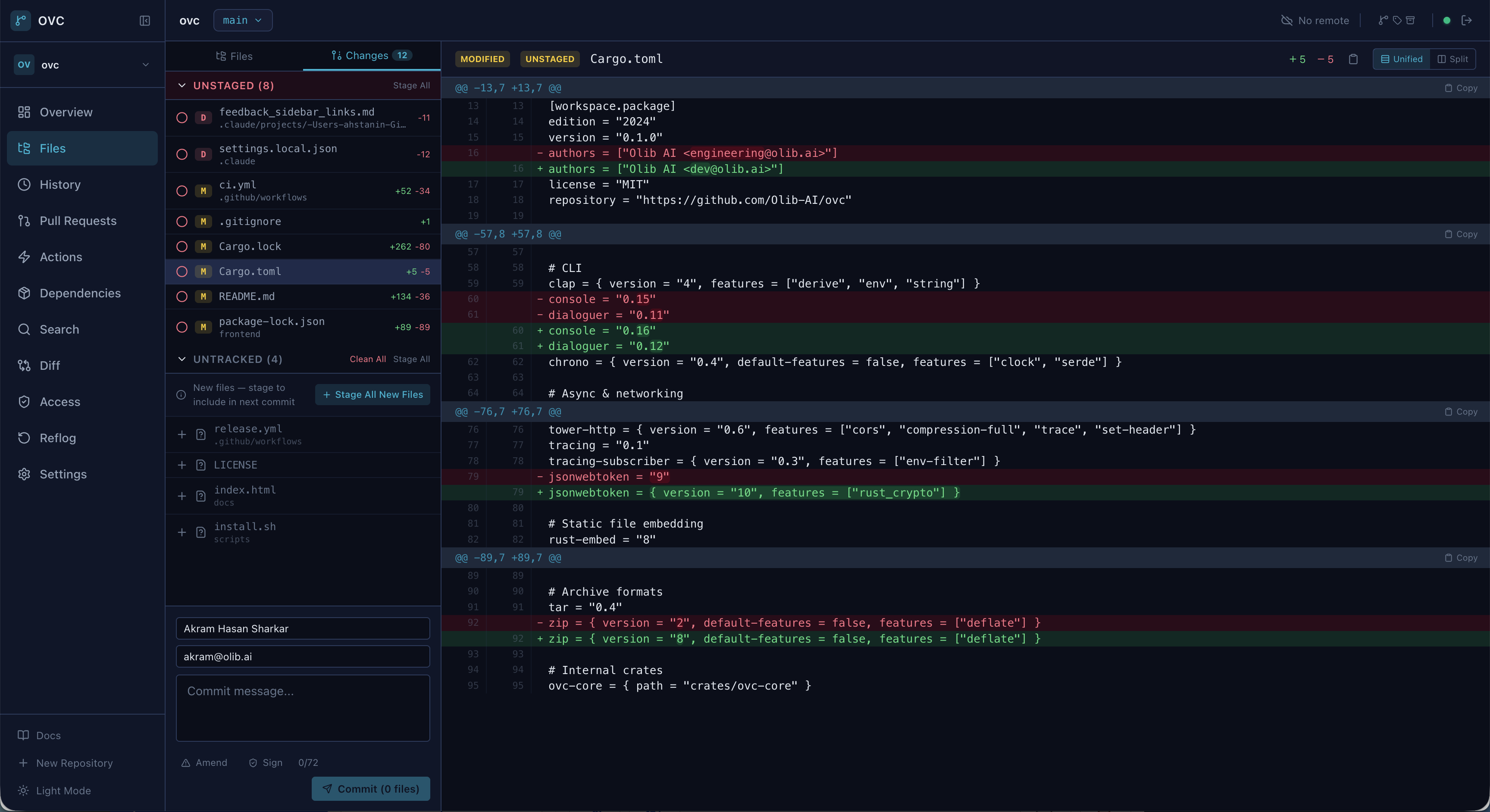
Staged changes and diff viewer
Staged changes with inline diff viewer
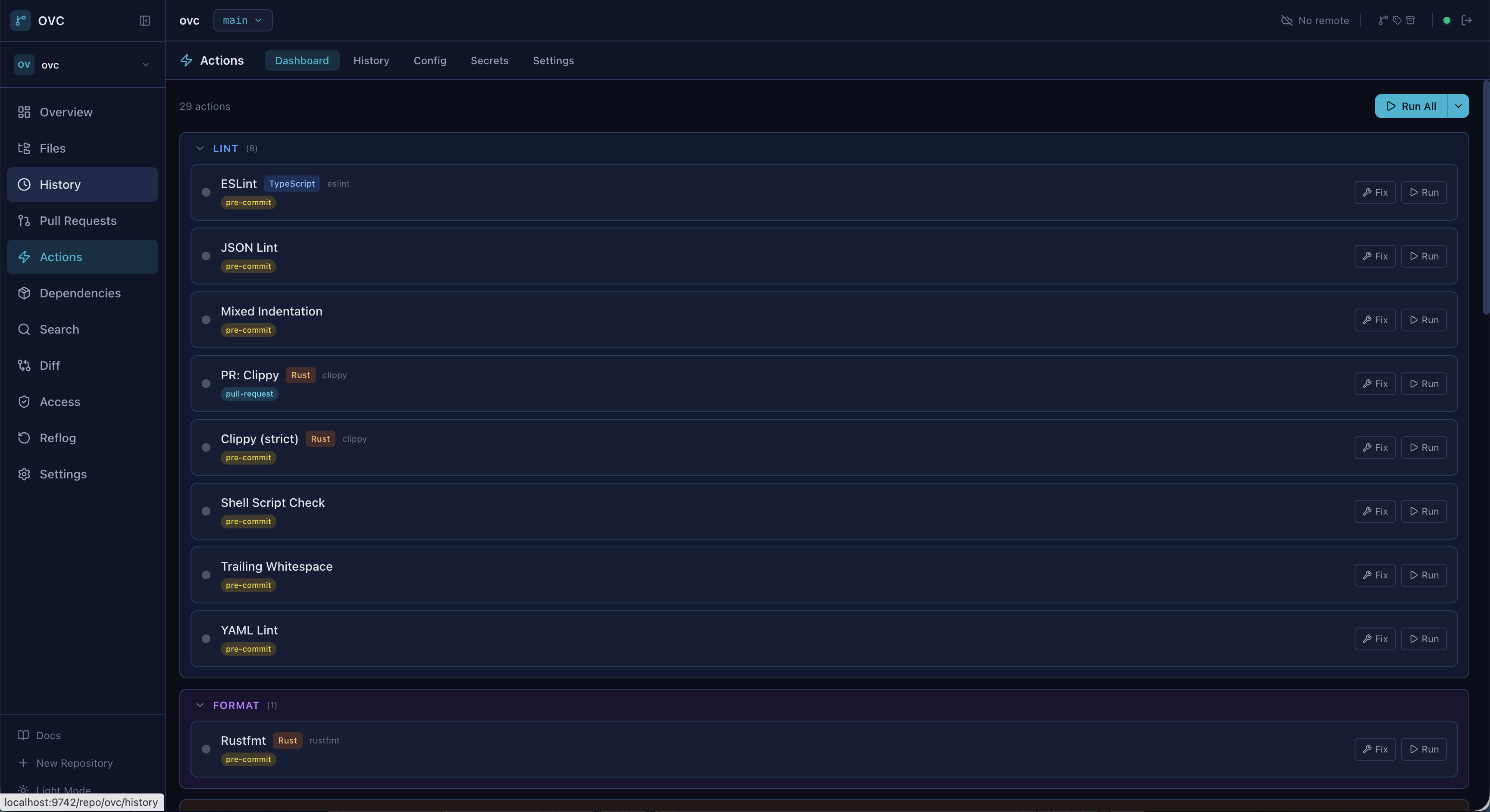
Actions CI/CD dashboard
Built-in CI/CD actions dashboard
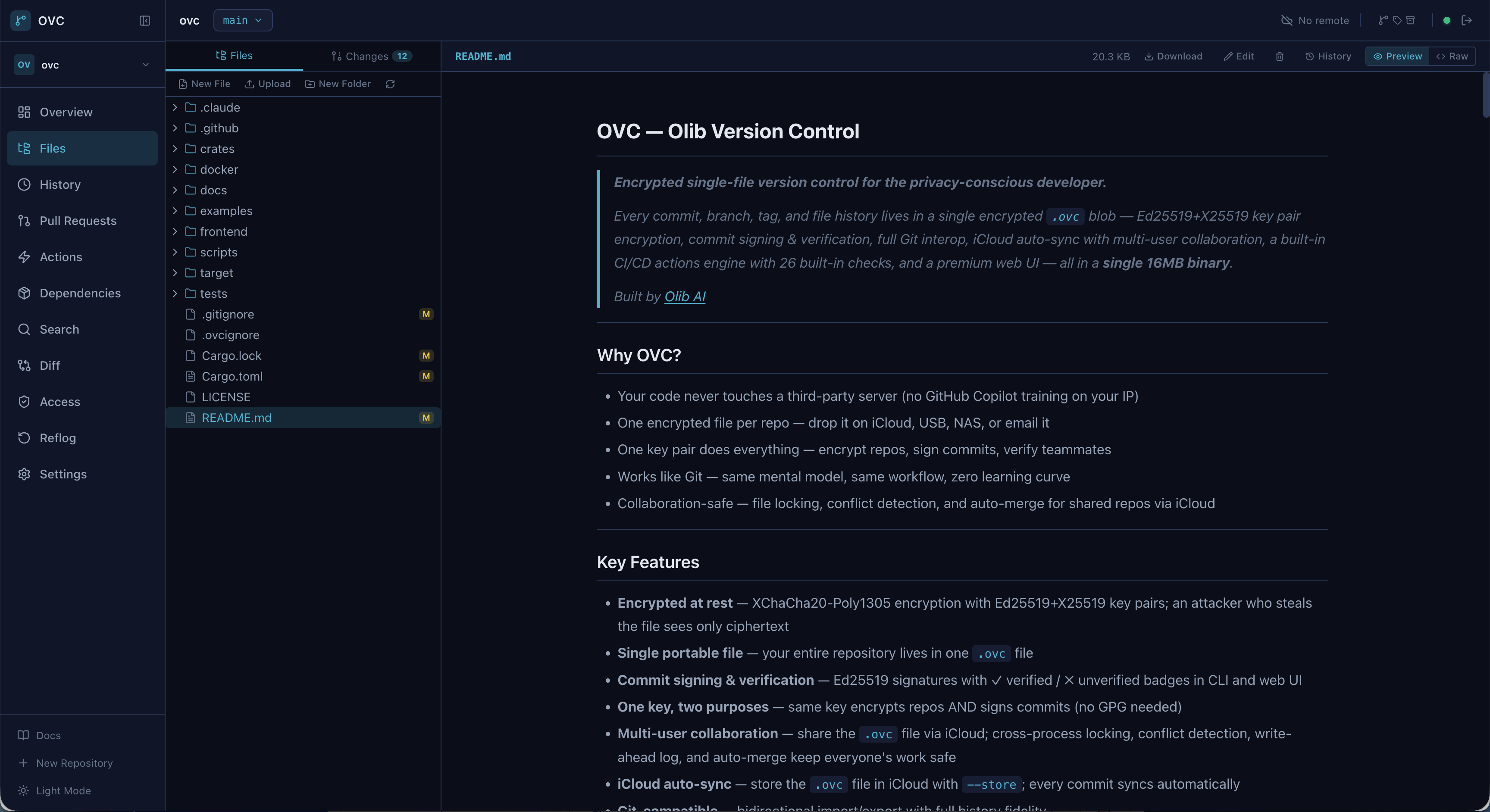
File manager and code browser
File manager with code preview
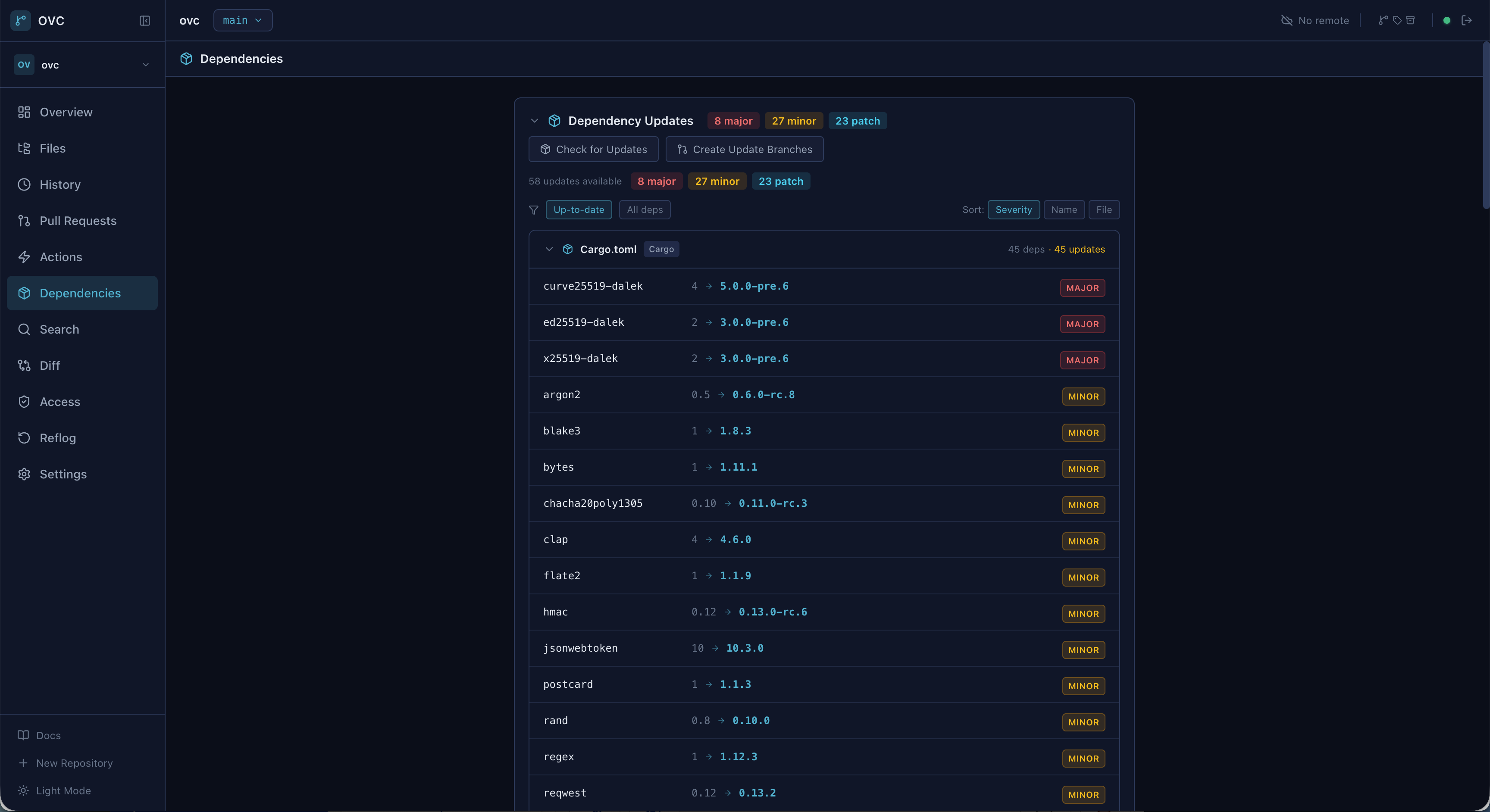
Dependency updates dashboard

Three commands to get started

Generate a key pair, create an encrypted repository, and start committing. Same workflow as Git.

Generate your key

One Ed25519+X25519 key pair encrypts repos and signs commits. No GPG, no separate keys.

ovc key generate --name mykey \ --identity "you@email.com"

Create a repository

Initialize an encrypted .ovc file. Optionally store it on any cloud for automatic sync.

ovc init --name project.ovc \ --key mykey

Commit and collaborate

Stage, commit, branch, merge — the full Git workflow you already know, fully encrypted.

ovc add . ovc commit -m "initial commit" ovc log --oneline --graph

Encryption is not optional

Every .ovc file is encrypted by default. Constant-time auth, secret zeroization, and bounded resource allocation throughout.

01

XChaCha20-Poly1305

256-bit encryption with 192-bit nonces per segment. Authenticated encryption prevents tampering.

02

Ed25519 commit signing

Every commit carries a cryptographic signature. One key pair handles both encryption and identity.

03

Argon2id key derivation

Memory-hard KDF with configurable parameters. Brute-force attacks are computationally infeasible.

04

Zero secrets in memory

All sensitive data zeroed on drop via Zeroizing wrappers. Constant-time authentication prevents timing attacks.

05

Memory-safe Rust

unsafe_code = "forbid" workspace-wide. No buffer overflows, no use-after-free, no data races.

Key Pair (Ed25519 + X25519) | |-- X25519 ECDH with ephemeral key | | | +-- HKDF-SHA256 | | | +-- Sealed Key Encryption Key | +-- Segment Encryption Key (256-bit) | +-- XChaCha20-Poly1305 | +-- Encrypted data (192-bit nonce per segment) What an attacker sees: 64 bytes header (magic, KDF params) ?????? ciphertext (everything else) 32 bytes trailer (HMAC, offsets) File names, commit messages, authors, branches, tags -- all encrypted.

Familiar commands, encrypted by default

If you know Git, you know OVC. Every operation works on encrypted repositories transparently.

ovc add .                          # Stage all files
ovc commit -m "add feature X"     # Commit (auto-signed)
ovc status                         # Working tree status
ovc log --oneline --graph         # Commit history
ovc diff --staged                  # View staged changes
ovc show HEAD~2                     # Inspect a commit
ovc branch feature-x               # Create branch
ovc checkout feature-x             # Switch branch
ovc merge feature-x                # Merge into current
ovc rebase main                    # Rebase onto main
ovc cherry-pick abc123             # Cherry-pick commit
ovc stash push -m "WIP"           # Stash changes
# Add a remote backend
ovc remote add origin gs://bucket/repos --backend gcs
ovc remote add nas /mnt/nas/repos --backend local

# Push/pull — only changed chunks transfer
ovc push
ovc pull

# Or store on iCloud for auto-sync
ovc init --store ~/iCloud/ovc-repos/ --key mykey
# Auto-detect languages and generate config
ovc actions init

# Run all pre-commit checks
ovc actions run --trigger pre-commit

# Commit runs hooks automatically
ovc commit -m "checked and verified"

# 26 built-in checks: secret scan, linting,
# dead code, complexity, and more

Start owning your code

Open source. MIT licensed. One command to install.